支持mermaid渲染
一、实现方案
项目没有使用现成的 markdown-it-mermaid 插件(因为兼容性问题),而是自行实现 Mermaid 渲染逻辑,集成在预渲染阶段。
实现思路
- 从编辑器内容中提取
```mermaid 代码块
- 调用 mermaid 库将代码块渲染为 SVG
- 将 SVG 替换回原文,再交给 markdown-it 渲染
二、Mermaid 渲染实现
2.1 渲染流程
Mermaid 渲染在预渲染阶段处理,代码位于 src/main/renders/HemyRender.ts:
Mermaid 渲染核心逻辑
| TypeScript |
|---|
| // 生成随机 ID
function generateRandomNumberString(length: number): string {
let result = ''
const characters = '0123456789'
for (let i = 0; i < length; i++) {
result += characters.charAt(Math.floor(Math.random() * characters.length))
}
return result
}
// 渲染 Mermaid 图表为 SVG
async function mermaidRender(graphDefinition: string): Promise<string> {
try {
const mermaidId = 'mermaid' + generateRandomNumberString(10)
const renderSvg = await mermaid.render(mermaidId, graphDefinition)
return Promise.resolve(
'<div><pre class="mermaid"><code style="height: auto;display: flex">' +
renderSvg.svg +
'</code></pre></div>'
)
} catch (error) {
console.log('mermaidRender error', error)
}
return ''
}
// 预渲染:处理所有 mermaid 代码块
async function preRenderMermaidProc(text: string) {
let renderResult = text
let match: RegExpExecArray | null = null
const regex = /```mermaid([\s\S]*?)```/g
// 使用全局搜索查找所有 mermaid 代码块
while ((match = regex.exec(text)) !== null) {
const renderedSvg = await mermaidRender(match[1])
renderResult = renderResult.replace(match[0], renderedSvg)
}
return renderResult
}
|
2.2 预览组件中的调用
在 MarkdownPreviewComponent.vue 中,编辑器内容变化时触发预渲染:
| TypeScript |
|---|
| // 预渲染:发送到主进程处理 mermaid、公式等
async function updateMarkdownPreRender() {
window.electron.ipcRenderer.send('pre-render-monaco-editor-content', props.editorContent)
}
// 预渲染结果 -> markdown-it 渲染 -> 后渲染
window.electron.ipcRenderer.on('pre-render-monaco-editor-content-result',
async (_, context) => {
const result = await editor.Render.PreMarkdownRender(context)
updateMarkdownPostRender(md.render(result))
})
|
2.3 独立 Mermaid 编辑窗口
项目还提供了独立的 Mermaid 编辑预览窗口(通过工具菜单 -> Mermaid 绘图打开),支持实时编辑和预览:
src/main/dialogs/OpenMermaidRenderFrame.ts:主进程创建 Mermaid 渲染窗口src/renderer/src/components/Markdown/MermaidRender.vue:渲染进程的 Mermaid 渲染组件
子组件 MermaidRender.vue 是为了给主进程的对话框进行实时渲染使用,通过 IPC 通信,将渲染结果发送到主进程,由主进程显示在对话框中。
三、Mermaid 模板插入
编辑器工具栏提供 Mermaid 模板快速插入功能,模板定义在 src/renderer/src/common/templates.ts 中:
- Mermaid Part1:流程图、时序图等基础模板
- Mermaid Part2:类图、状态图、甘特图等高级模板
通过插入菜单 -> Mermaid -> 选择模板,将模板代码插入到编辑器当前光标位置。
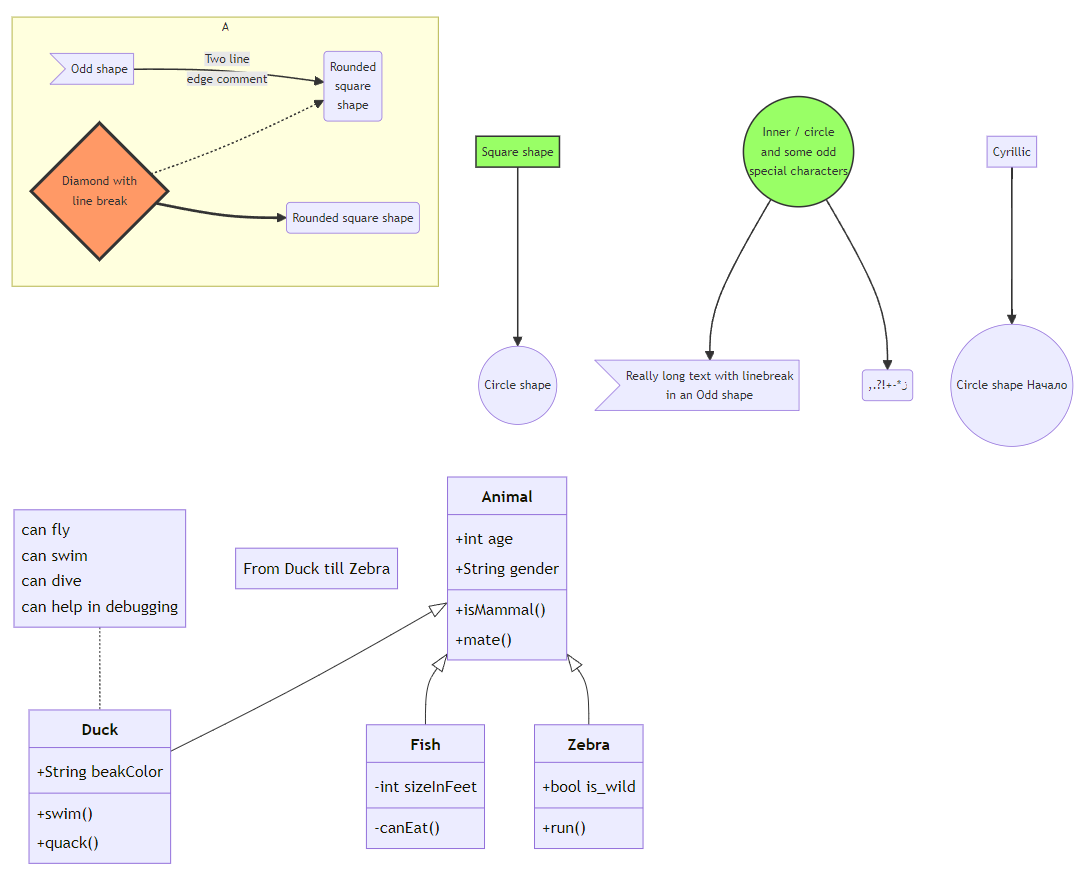
四、效果示例
mermaid 基本流程图源码示例
| Text Only |
|---|
| graph TB
sq[Square shape] --> ci((Circle shape))
subgraph A
od>Odd shape]-- Two line<br/>edge comment --> ro
di{Diamond with <br/> line break} -.-> ro(Rounded<br>square<br>shape)
di==>ro2(Rounded square shape)
end
%% Notice that no text in shape are added here instead that is appended further down
e --> od3>Really long text with linebreak<br>in an Odd shape]
%% Comments after double percent signs
e((Inner / circle<br>and some odd <br>special characters)) --> f(,.?!+-*ز)
cyr[Cyrillic]-->cyr2((Circle shape Начало));
classDef green fill:#9f6,stroke:#333,stroke-width:2px;
classDef orange fill:#f96,stroke:#333,stroke-width:4px;
class sq,e green
class di orange
|
mermaid 类图源码示例
| Text Only |
|---|
| ---
title: Animal example
---
classDiagram
note "From Duck till Zebra"
Animal <|-- Duck
note for Duck "can fly\ncan swim\ncan dive\ncan help in debugging"
Animal <|-- Fish
Animal <|-- Zebra
Animal : +int age
Animal : +String gender
Animal: +isMammal()
Animal: +mate()
class Duck{
+String beakColor
+swim()
+quack()
}
class Fish{
-int sizeInFeet
-canEat()
}
class Zebra{
+bool is_wild
+run()
}
|
mermaid 时序图源码示例
| Text Only |
|---|
| sequenceDiagram
participant Alice
participant Bob
Alice->>Bob: Hello Bob, how are you?
Bob-->>Alice: Great!
Alice->>Bob: Where do you want to go?
Bob-->>Alice: Let's go to the cinema
Bob->>Alice: See you at 7pm
|
mermaid 甘特图源码示例
| Text Only |
|---|
| gantt
title A Gantt Diagram
dateFormat YYYY-MM-DD
section Section
A task :a1, 2014-01-01, 30d
Another task :after a1 , 20d
section Another
Task in sec :2014-01-12 , 12d
another task : 24d
|
效果如图:
五、相关文档